License expiration and renewal
Big picture
Review options for tracking Calico Enterprise license expiration.
FAQ
How long does it take to get a new Calico Enterprise license?
After you submit a sales purchase order to Tigera, 1-2 days.
Is there a grace period?
Yes, there is a grace period of 30 days (as of April 2022).
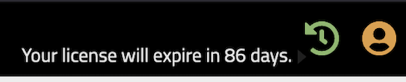
Does the web console display license expiration?
Yes. The license indicator in the web console (top right banner) turns red when the license expires.
What happens when a license expires or is invalid?
Data plane traffic continues to flow without interruption — policy enforcement, Egress Gateways, cluster mesh, Ingress Gateway, and Envoy keep running as configured. Observability and management features are degraded:
| Area | Behavior after expiration |
|---|---|
| Calico Enterprise resources | Read-only. The Tigera API server rejects create and update requests; get, list, and delete on existing resources still succeed. Calico Open Source resources are not affected. |
| Flow, DNS, and audit logs | Stopped. Fluentd is scaled down and logs are no longer forwarded to Elasticsearch. |
| Prometheus metrics for Calico Enterprise components | Stopped. The Operator removes the Calico Enterprise ServiceMonitor so metrics are no longer scraped. |
| Web console | Service Graph, Kibana, Alerts, and Compliance remain visible in read-only mode; attempts to create or modify resources are not saved. |
We recommend that you proactively manage your license to avoid disruption to observability and management workflows.
Do licenses cover free upgrades in Calico Enterprise?
Yes.
How can I check license status from the command line?
Run:
kubectl get tigerastatus
The Tigera Operator reports license condition in tigerastatus, including a warning while you are inside the 30-day grace period.
How do I monitor my license?
- License metrics and alerts
- Use
kubectl get tigerastatusto view license condition reported by the Tigera Operator - Use
kubectlto get license key information
License metrics
Calico Enterprise provides license metrics, such as the number of days until license expiration, through the License Agent component and Prometheus. For details on deploying the license agent and creating expiration alerts, see License metrics.
To route license alerts, see Configure Alertmanager.